Bulk Background Removal for E-Commerce: Amazon & Shopify-Ready White Backgrounds
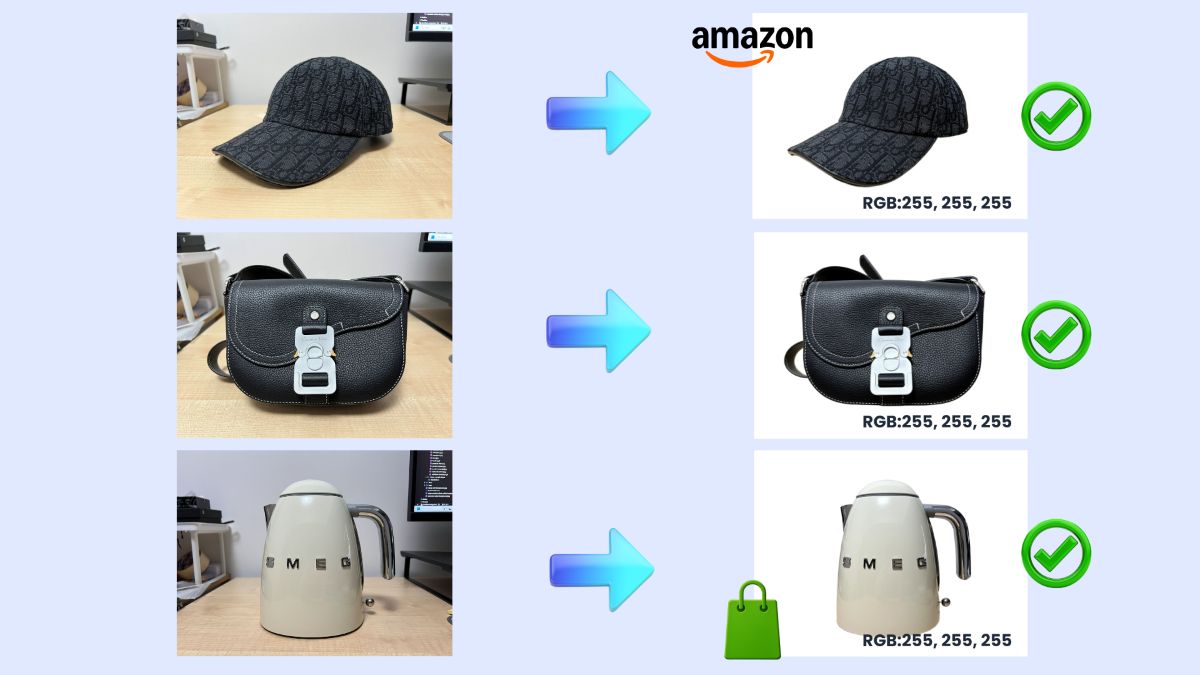
What You'll Learn
✅ Amazon's exact white background requirement (RGB 255, 255, 255)
✅ Shopify's product photography standards
✅ A batch workflow for processing 20–200 images
✅ Copy-paste compliance checklist for your team
If you're selling on Amazon, Shopify, or any major marketplace, you've probably discovered that product photography has strict rules. The most important one? Pure white backgrounds.
Amazon will suppress your listing if the background isn't exactly RGB 255, 255, 255. Not "almost white." Not "light gray." Pure white.
This guide covers what "compliant" actually means, and how to batch-process your entire catalog without manually editing each image.
What "Compliant" Means (Why Marketplaces Care)
Marketplaces enforce white background requirements for two reasons:
- Consistency — When every product has the same background, shoppers can browse faster and compare items more easily.
- Professionalism — Clean backgrounds signal quality. Products with messy or inconsistent backgrounds look less trustworthy.
The Cost of Non-Compliance
Amazon will suppress your listing if your main image doesn't meet requirements. Your product becomes invisible in search results until you fix it.
Amazon Main Image Requirements
Amazon's requirements are documented in Seller Central (G1881). Here are the key specifications:
Background Requirement
| Requirement | Specification |
|---|---|
| Background Color | Pure white (RGB 255, 255, 255) |
| Why | Blends with Amazon's search and product detail pages |
| If Non-Compliant | Listing suppressed from search |
Image Size Requirements
| Specification | Value |
|---|---|
| Optimal (for zoom) | 1600px+ on longest side |
| Minimum (for zoom) | 1000px on longest side |
| Minimum (for site) | 500px on longest side |
| Maximum | 10,000px on longest side |
| Product fill | At least 85% of image area |
Format Requirements
| Format | Status |
|---|---|
| JPEG (.jpg, .jpeg) | ✅ Preferred |
| PNG (.png) | ✅ Allowed |
| TIFF (.tif) | ✅ Allowed |
| GIF (.gif) | ✅ Allowed (no animation) |
What's NOT Allowed on Main Images
- ❌ Text, logos, or watermarks
- ❌ Borders or color blocks
- ❌ Multiple product views
- ❌ Product packaging (unless it's a key feature)
- ❌ Props or accessories not included in the sale
Source
Requirements verified from Amazon Seller Central Product Image Guide and confirmed via Jungle Scout's image requirements guide.
Shopify Product Photography Guidance
Shopify doesn't enforce as strict as Amazon, but their official guidance strongly recommends white backgrounds:
"Using a pure white background for your product to sit in front of ensures that your product is the central focus." — Shopify Help Center
Shopify Best Practices
| Practice | Recommendation |
|---|---|
| Background | Pure white for main product shots |
| Consistency | Same background across catalog |
| Additional images | Lifestyle shots allowed |
| Format | JPEG for photos, PNG for graphics |
Pro Tip
Even if Shopify doesn't reject non-white backgrounds, using consistent white backgrounds improves your store's professional appearance and makes catalog management easier.
Batch Workflow (20–200 Images)
Processing product photos one by one is a time-sink. Here's a streamlined workflow for bulk processing:
Prep: Organize Your Files
Create a folder structure before you start:
product-photos/├── 01-originals/ # Raw photos from shoot├── 02-processed/ # After background removal├── 03-final/ # Ready for upload└── naming-convention.txt # SKU-based naming rulesNaming convention example:
SKU-001-main.jpg— Main imageSKU-001-alt-01.jpg— First alternateSKU-001-alt-02.jpg— Second alternate
Batch Background Removal
Upload your images in batches to a background removal tool. SimplyPNG supports up to 50 images at once.
- Go to SimplyPNG Batch Processing
- Upload your folder of originals
- Wait for processing (typically 1–2 seconds per image)
- Download all as ZIP
Place on White Background
After background removal, you have transparent PNGs. To meet Amazon's requirements, place them on a white canvas:
Option A: Automated (Recommended)
- SimplyPNG's batch mode exports with white backgrounds by default for e-commerce workflows
Option B: Manual (Photoshop/Canva)
- Create a new canvas with RGB 255, 255, 255
- Place your transparent PNG
- Adjust margins for 85% product fill
- Export as JPEG
Standardize Margins & Framing
For a consistent catalog:
- Center the product
- Maintain equal margins on all sides
- Ensure product fills 85% of frame (Amazon requirement)
QA: Spot-Check Rules
Before uploading, verify a sample of images:
- Background check — Use a color picker to confirm RGB 255, 255, 255
- Size check — Confirm dimensions meet minimum requirements
- Edge check — Look for halos, rough edges, or missing details
- Fill check — Product should fill ~85% of the image
Comparison: Amazon vs Shopify Requirements
| Requirement | Amazon | Shopify |
|---|---|---|
| White Background | Required (RGB 255, 255, 255) | Strongly recommended |
| Minimum Size | 1000px (for zoom) | No strict minimum |
| Optimal Size | 1600px+ | Recommended square |
| Product Fill | At least 85% | No requirement |
| Text/Logos | ❌ Prohibited on main | Allowed |
| Non-Compliance | Listing suppressed | No penalty |
| Format | JPEG preferred | JPEG for photos |
Compliance Checklist (Copy/Paste for Your Team)
Use this checklist before uploading to any marketplace:
## Pre-Upload QA Checklist
### Background- [ ] Background is pure white (RGB 255, 255, 255)- [ ] No shadows, gradients, or off-white areas- [ ] Color picker confirms exact values
### Sizing- [ ] Image is at least 1000px on longest side- [ ] Image is ideally 1600px+ for zoom functionality- [ ] Image does not exceed 10,000px- [ ] Product fills at least 85% of frame
### Content- [ ] Only the product for sale is shown- [ ] No text, logos, or watermarks- [ ] No props or accessories not included- [ ] Product is out of packaging
### Technical- [ ] File format is JPEG (preferred) or PNG- [ ] File is named with correct SKU convention- [ ] Image is not blurry or pixelated
### Final- [ ] Spot-checked 10% of batch for edge quality- [ ] Verified on both desktop and mobile preview
"If It Fails" Troubleshooting
Problem: "Non-pure white background" error
Cause: Your background isn't exactly RGB 255, 255, 255.
Fix:
- Open in photo editor
- Use color picker to check background areas
- If values are 254, 253, etc., use Levels/Curves to push to 255
- Alternatively, use background removal tool and place on true white canvas
Problem: Listing suppressed after upload
Cause: Amazon's automated system detected a violation.
Fix:
- Check all main image requirements
- Reprocess the image with proper settings
- Re-upload and wait for revalidation (usually 24–48 hours)
Problem: Halos or rough edges around product
Cause: Poor background removal quality or JPEG compression artifacts.
Fix:
- Use higher-resolution source images
- Export as PNG during processing, convert to JPEG at final step
- Use a higher-quality background removal tool
Need Help with Complex Images?
Hair, fur, and transparent objects require specialized processing. See our guide on fixing jagged edges for advanced techniques.
FAQ
Frequently Asked Questions
Conclusion
Creating compliant product images doesn't have to be tedious. With a proper batch workflow:
- Organize your files with consistent naming
- Batch process using a bulk background removal tool
- Standardize margins and framing
- QA check a sample before uploading
The key to avoiding listing suppressions? Always verify that background is exactly RGB 255, 255, 255 — not almost white, but pure white.
Related Articles:
- Cheapest Way to Get Transparent PNGs Without Canva Pro
- Why Your Cutouts Look Jagged (Clean Edges for Hair/Fur)
- PNG vs JPEG vs WebP: Export Presets for Cutouts
Last Updated: February 3, 2026
Author: SimplyPNG
Tags: #e-commerce #Amazon #Shopify #white-background #batch-processing
Sources:
- Amazon Seller Central — Image Requirements (G1881) — Amazon official seller documentation
- Jungle Scout — Amazon Product Image Requirements — Detailed guide citing Amazon policy
- Shopify — Ultimate Product Photography Guide — Shopify Blog
Ready to remove backgrounds?
Try SimplyPNG's AI-powered background removal tool for free. No signup required!